
.avif)





.avif)

Why Mural for QBRs
Your reps and CSMs want to build trust and engagement quickly. Plus, they need to showcase customer data and insights to inspire customers to take action.
Mural transforms QBR sessions so there’s alignment right from the start. And since you’re collaborating in one visual space, you’ll keep customers engaged and involved during the meeting. They’ll leave the meeting feeling excited and ready to move forward.
Benefits of using Mural for QBRs
Visual collaboration will enrich your QBRs and drive better outcomes for reps, CSMs, and customers. Here’s how:
- Save time with templates: Streamline the design of your QBR sessions. Ask your team to personalize the quarterly business review template, weaving in client metrics and branding elements to make it tailored and relevant.
- Lead better meetings with execs: QBRs for key accounts are more interactive with Mural. Zoom out for a high-level view to engage executives and decision makers, using the Outline to navigate.
- Run more compelling sessions: Keep QBRs engaging with features like the Timer, Laser pointer, and Voting. As you progress through the session, use the Summon and Follow features so clients stay on track.
- Get to insights faster: Use Mural AI for a quick synthesis of ideas and insights live in your session. Spot trends and patterns in real time, together.
- Use human-centered design activities: Simple activities like Rose, Thorn, Bud, or the Prioritization Matrix can take your stakeholders and clients from silent to engaged. Lead an interactive session with LUMA methods to explore team challenges and opportunities more deeply.
.webp)
Common challenges with QBRs and how to overcome them with Mural
Let’s be real: QBRs can be a pain in the you-know-what to plan and run. Mural helps your sales and customer success teams transform rote meetings into productive sessions. Here’s a few ways Mural can help you tackle common QBR challenges:
- Long meetings with low engagement: Sales teams may lose the attention of leaders or clients with QBRs that are too long, or include too much data. Since 63% of people remember stories from presentations, use Mural's interactive canvas to storytell with Presentation mode. For internal QBRs, encourage stakeholders and leaders to add comments and questions live during the meeting to keep conversation flowing.
- Overwhelmed by data: Your reps are probably overwhelmed by the amount of sales data and performance metrics. It can be hard to weed through and concentrate on the most critical information. Content with visuals are 43% more effective at persuading people to act, so have your team use Mural to visualize data with charts, graphs, and diagrams.
- Disconnected remote team members: Remote or hybrid sales team members may feel especially isolated from the team or information, causing misalignment. Mural's platform helps remote sales team members work together live or async, improving communication and strategy alignment.
- Staying on track: It’s tough to get through presentations, deep dive discussions, coaching from leadership (or feedback from clients), all in a single QBR. Your team may feel rushed or miss agenda items. Try Mural's structured templates and time-box activities using the Timer to keep QBRs on schedule and the team on track.
Best practices with Mural for QBRs
It’s easy to run the same old QBR session quarter after quarter. But with some tweaking, your QBRs will be more impactful so you can strengthen your customer relationships and boost your sales results.
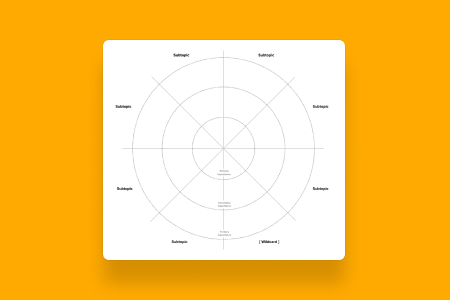
- Run two-way conversations: A great QBR isn’t just a one-way presentation. For internal QBRs, spend time with your sales team, customer success team, and cross-functional partners problem-solving and strategizing. Or with customers, lead a compelling conversation using human-centered methods — try What’s on Your Radar, a favorite here at Mural.
- Use facilitation features for engagement: Facilitation Superpowers like timers, laser pointers, summoning, voting, and private mode keep QBR meetings focused and productive. Better facilitation means you’ll align faster and generate more value from each QBR.
- Supercharge your session with AI: Use Mural AI to generate content quickly as you prepare for and run QBRs. Save time during the session by synthesizing or classifying stakeholder or customer pain points or feedback. Customers will feel more understood, helping your account managers and customer success teams build trust.
- Document takeaways for actionable next steps: Document key decisions, takeaways, and action items in Mural for ongoing reference. When wrapping up QBRs for key accounts, make sure to assign follow-up tasks and track progress to maintain the momentum. The RACI template can help your clients and reps stay organized.
%20(1).webp)
.webp)
.webp)








.webp)