On this page
Template use cases
Use User journey template
Get started


Define the user experience to identify opportunities to improve
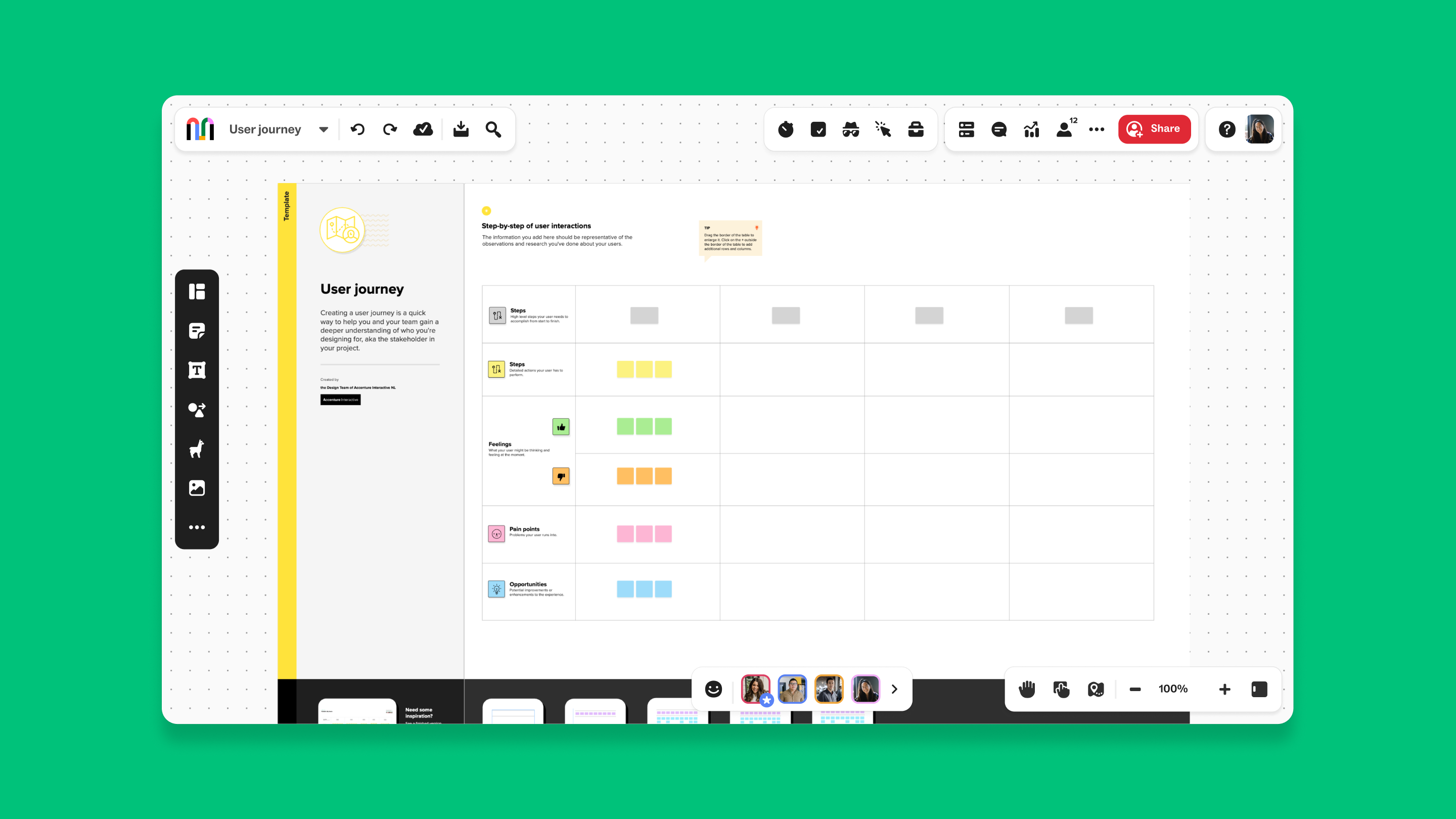
A user journey template is a template for Mural’s digital workspace, designed to help teams map out and understand the entire user experience as they interact with a product, service, or system. This template provides a visual and organized way to capture and analyze the various stages and touchpoints of a user's journey, from initial engagement to the final action. By using the User journey template, teams can identify user potential pain points, uncover opportunities, and optimize the user experience to meet their needs and enhance satisfaction.
To make the most out of the user journey template in Mural, follow these steps:
What are the phases of the process? For example, if the user is going to the market, the overarching phases of the trip are getting ready to leave, traveling to the market, shopping, and returning home.
What steps are involved in the above phases? For example, in order to get ready to leave, the user will likely collect any shopping bags that they have, prepare a list of items they want to buy, decide on a mode of transportation, etc.
What should the user feel as they move through the phases? For example, if the user is preparing to leave for the market, they might be thinking, 'What is it that I'd like to make for dinner this week?' How does what the user is feeling affect their journey?
What are some issues that the user is likely to face as they move through each phase? In the market example, it's possible that they don't have enough shopping bags to carry all of the goods they would like to buy.
What opportunities for improvement can you identify that would make the phases or the individual steps easier for the user? Using the above market example again, how could planning be facilitated, or transport addressed? What could be simplified or streamlined so that the user has a smoother and easier experience overall?

Use the user journey template during the product development phase to understand how users will interact with your product from the initial concept to the final release. This helps you identify potential issues early and ensures that the user experience is seamless and intuitive.
UX designers can use the user journey template for mapping user experiences and identifying areas where the design can be improved. This template helps in creating a more user-friendly and engaging product, leading to higher user satisfaction and retention.
Customer experience teams can use the user journey template to analyze the entire customer journey, from awareness to advocacy. By identifying pain points and opportunities, you can implement changes that enhance the customer experience and drive loyalty.
Service teams can use the user journey template to map out the customer support process and identify areas where the service can be improved. This helps in reducing customer frustration and increasing satisfaction, leading to better customer retention and advocacy.
To run a successful user journey workshop, consider the following tips:
A user journey is a step-by-step path that a user takes while interacting with a product, service, or system. It includes all the touchpoints and stages, from initial awareness to the final action, that a user or customer would undergo to complete a task. Using a user flow template to understand the user journey helps optimize the user experience and identify areas for improvement.
Creating a user journey offers several benefits:
User understanding: Gain a deeper understanding of your users’ needs, behaviors, and pain points.
Experience optimization: Identify and address areas where the user experience can be improved, leading to higher satisfaction and retention.
Strategic planning: Use insights from the user journey to inform product development, marketing, and customer support strategies.
Team alignment: Ensure that all team members are aligned on the user experience and the areas that need attention.
Customer advocacy: Create a more enjoyable and seamless user experience, turning users into advocates for your brand.
A user journey map in UX design is a visual representation of the user’s experience with a product or service. It helps designers and teams understand the user’s interactions, emotions, and pain points at each stage of the journey. By using a user journey map, you can create more user-centered designs and improve the overall user experience.
There are several types of user journey maps, including:
Current state journey maps: These maps reflect the current user experience and help identify existing pain points and opportunities.
Future state journey maps: These maps outline the desired user experience and help in planning and implementing changes to achieve this vision.
Day-in-the-life journey maps: These maps focus on the user’s daily interactions with your product or service, providing a detailed view of their routine and how your product fits into it.
Service blueprints: These maps go beyond the user journey to include the back-end processes and touchpoints that support the user experience.
A user journey map should be used in a project when:
Identifying user needs: At the beginning of a project to understand the user’s requirements and expectations.
Validating design decisions: During the design phase to ensure that the user experience is intuitive and meets user needs.
Improving customer support: After a product is launched to identify areas where customer support can be enhanced.
Optimizing the user experience: Whenever you need to refine the user journey to make it more efficient and enjoyable.
A good UX journey map includes the following components:
User persona: A detailed description of the user, including their goals, behaviors, and pain points.
Stages of the journey: Clear definitions of the various stages, such as awareness, consideration, purchase, usage, retention, and advocacy.
Touchpoints: Specific interactions the user has with your product or service at each stage.
User emotions: How the user feels at each touchpoint, which can provide valuable insights into their experience.
Actions and tasks: What the user does at each stage and any tasks they need to complete.
Opportunities and pain points: Areas where the user experience can be improved or where users encounter difficulties.
A user story is a brief, informal description of a feature from the user’s perspective, often used in Agile development. A user journey, on the other hand, is a detailed, visual map of the user’s experience with a product or service, covering multiple stages and touchpoints. While user stories help in understanding specific features, user journeys provide a comprehensive view of the entire user experience.
No credit card required