

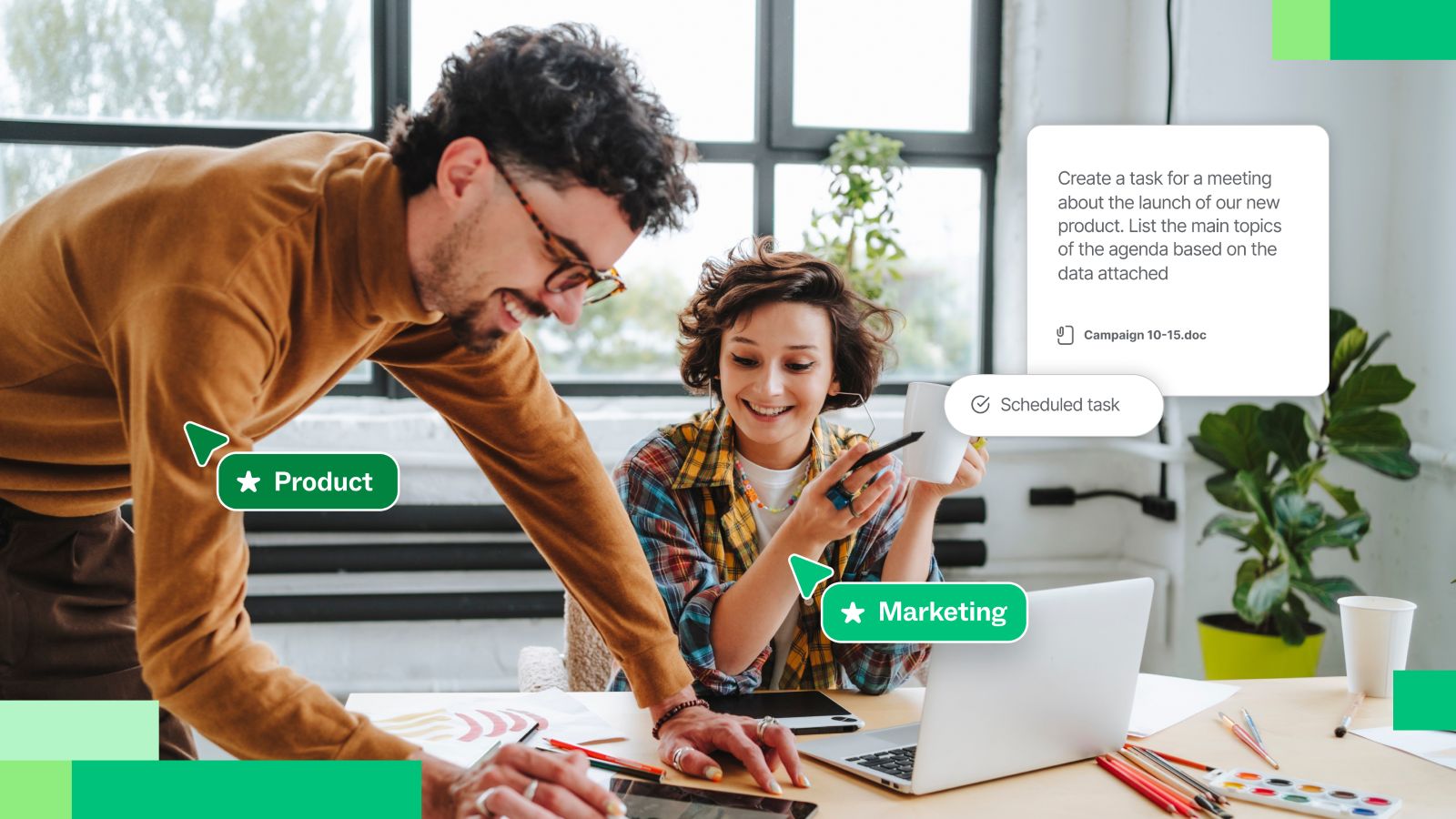
AI is moving beyond the prompt-and-response model that defined the first wave of generative AI at work. Instead of waiting for someone to ask a question or request an output, AI agents can work toward goals, take multiple steps, interact with tools, and contribute as work evolves.
For teams, that changes where AI fits into the workflow. An agent might gather research before a planning session, organize information for the team to review, update a shared artifact as decisions change, or distribute next steps after the work is done.
But giving an agent more autonomy isn't enough to make it a useful collaborator. AI agents for teams need access to the context behind the work: what the team is trying to accomplish, what has already been decided, what is changing, and how the pieces fit together.
That shift, from isolated AI assistance to AI participating in shared work, is what makes agentic workflows significant for teams.
From AI assistance to agentic workflows
Most people first encountered generative AI as an assistant. You enter a prompt, the AI generates a response, and you decide what to do with it.
AI agents extend that model. Instead of responding to one request at a time, an agent can work toward an objective through a sequence of actions. Depending on the tools and information available to it, an agent might retrieve information, create or update an artifact, evaluate what happened, and take another action.
That creates the foundation for agentic workflows: workflows in which AI takes actions alongside people rather than simply generating content for them.
Human involvement remains essential. Teams still determine the objective, decide what information an agent can access, set boundaries around its role, and review decisions where judgment matters. The useful distinction is not human work versus autonomous AI. It's how teams divide work between people and agents so each can contribute effectively.
AI assistants vs. AI agents
AI assistants help people complete individual tasks, while AI agents can take actions and complete multiple steps toward an outcome.
An assistant might summarize research when asked. An agent could retrieve the relevant research, organize the findings, add them to the team's workspace, and update that work as new information becomes available.
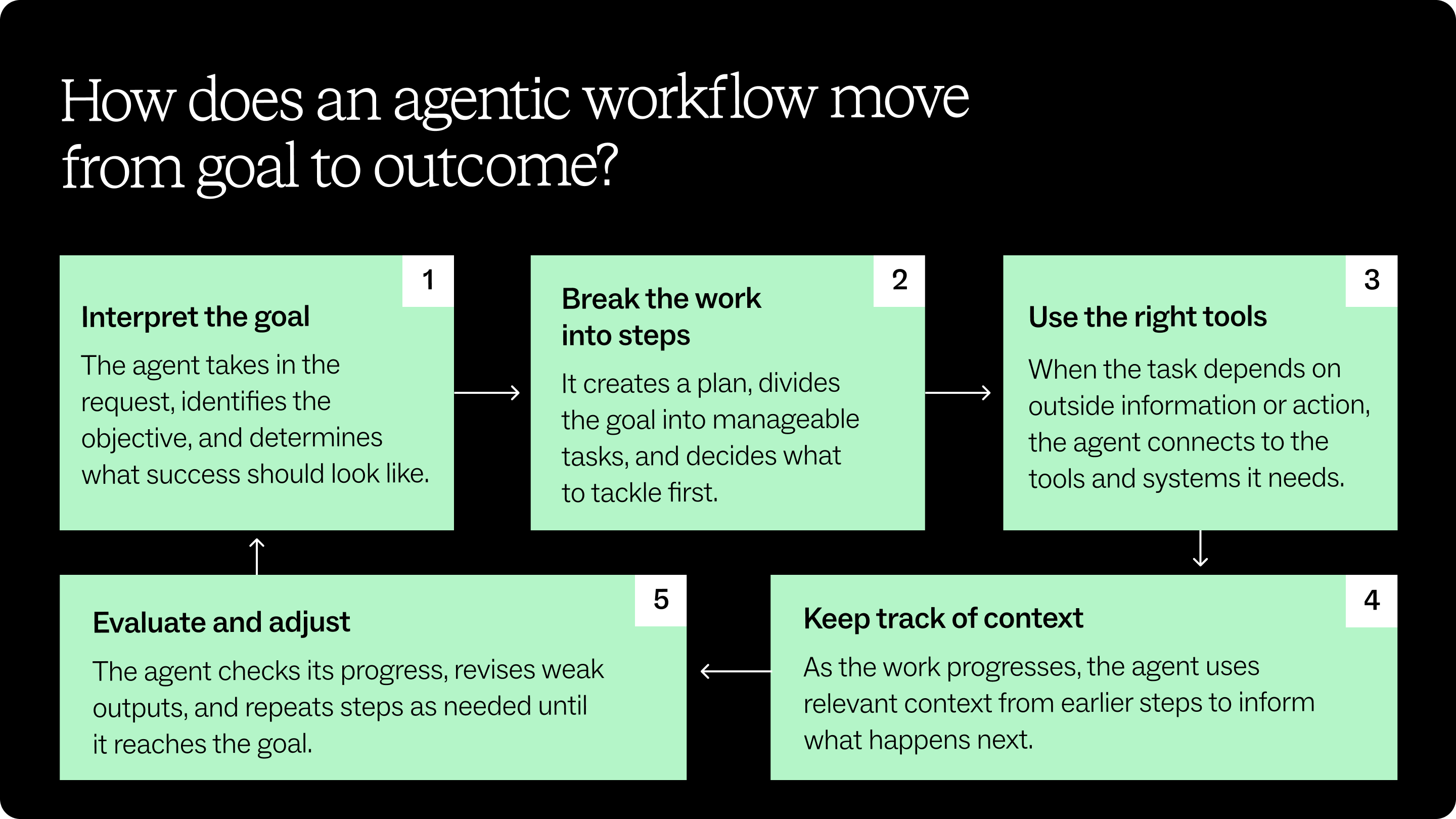
Where AI agents fit into team workflows
The strongest use cases for AI workflow automation aren't necessarily the biggest tasks. They're often the recurring pieces of work that consume time between the moments when teams need to think, discuss, and decide.
Consider a product team preparing for a planning session. Relevant context might be scattered across research interviews, project documentation, tickets, meeting notes, and previous planning work. An agent with access to those sources could gather and synthesize information, then organize it into a starting point for the team.
AI agents can contribute to team workflows by:
- Researching and synthesizing information from relevant sources
- Preparing collaborative work before a meeting or workshop
- Organizing ideas, findings, and other inputs for review
- Finding relevant team knowledge when someone needs it
- Creating structured starting points for planning and brainstorming
- Coordinating action items and next steps
- Moving information between tools as work progresses
- Turning existing information into artifacts teams can review and refine
The goal isn't to remove people from these workflows. It's to reduce the manual work surrounding collaboration so people can spend more time applying judgment, challenging assumptions, and making decisions.
That difference becomes increasingly important as AI agents move into workflows involving multiple people.
How AI agents change team collaboration
Individual productivity tools optimize for one person's work. Teams have a different problem.
A useful output still has to reach the right people. Everyone needs enough context to understand it. Someone has to reconcile conflicting information, incorporate feedback, record decisions, and move the result into the next stage of work.
AI agents for collaboration can reduce some of those handoffs. Instead of one person asking an AI tool for an output, copying it into another application, explaining it to the team, and manually carrying the result forward, an agent can participate in more of the workflow itself.
That can create greater continuity across stages of work. Research can become a starting point for synthesis. Synthesis can inform a planning canvas. Decisions made during planning can become action items in the tools teams use to execute, with less rebuilding of context between steps.
This points toward a different model for human-AI collaboration, in which people and agents contribute to shared work, with people retaining judgment and ownership while agents accelerate preparation, organization, synthesis, and follow-through.
The goal in automating work is to help people and AI contribute more effectively to work the team shares.
What AI agents need to understand your team
An agent can only act on the context available to it.
For simple tasks, that context might fit into a single prompt. Team workflows are rarely that self-contained. They depend on information that accumulates across projects, conversations, decisions, tools, and relationships.
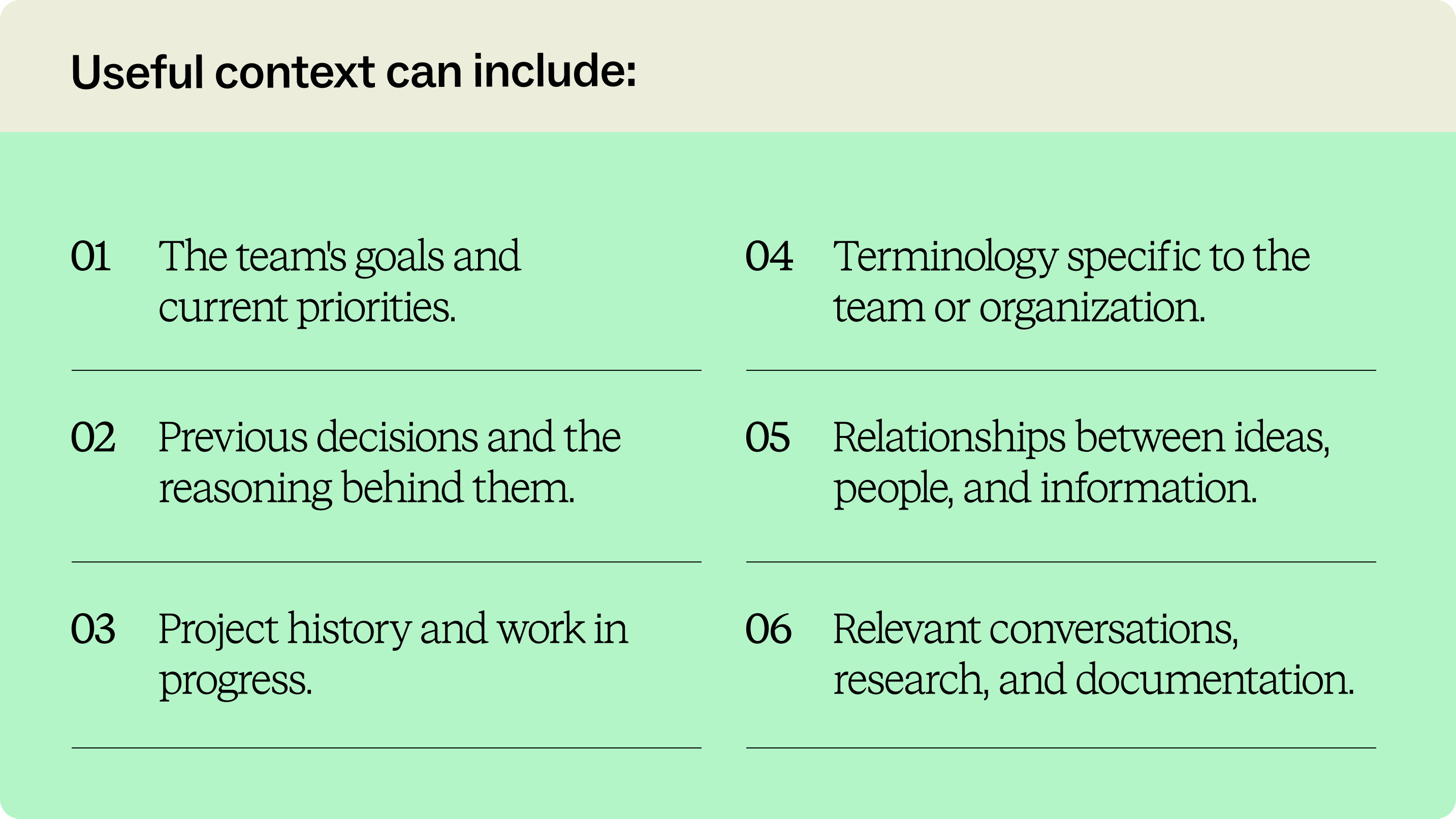
Useful context can include:
- The team's goals and current priorities
- Previous decisions and the reasoning behind them
- Project history and work in progress
- Terminology specific to the team or organization
- Relationships between ideas, people, and information
- Relevant conversations, research, and documentation
Imagine asking an agent to prepare a project planning session. Knowing the project name isn't enough. The agent becomes dramatically more useful if it can also work from the team's research, understand decisions made in previous meetings, see outstanding dependencies, and recognize which questions remain unresolved.
The same principle applies after a meeting. A transcript captures what people said, but the transcript alone isn't necessarily shared understanding. Teams still need to identify themes, connect ideas, clarify decisions, and determine what happens next. Meeting intelligence becomes more valuable when that conversation context can inform the collaborative work that follows.
Just like humans, the more relevant context an AI agent can work with, the better positioned it is to contribute within the team's actual workflow rather than produce an isolated answer.
How teams can prepare for agentic workflows
Adopting AI agents isn't simply a matter of adding another tool. Teams need to decide where and how agents should participate, and design workflows accordingly.
Start with a tangible source of friction. Look for places where people repeatedly gather the same information, reconstruct context, prepare similar artifacts, transfer work between systems, or spend time on administrative follow-up.
Then define what useful agent participation looks like. What should the agent be able to see? What actions should it take? What should always require human review?
For example, a research team might use an agent to turn interview findings into a first-pass affinity diagram. The agent can reduce the manual work of transferring insights and organizing an initial structure. Researchers still interpret the findings, challenge the groupings, and decide which patterns matter.
A technical program manager might use an agent after a workshop to identify decisions and next steps, then distribute them to connected project tools. The team remains responsible for the decisions; the agent handles the repetitive work of moving the information where it needs to go.
Successful agentic workflows therefore depend on a few deliberate choices: identify the work where an agent adds value, provide the relevant context, establish clear boundaries, and keep people involved wherever interpretation, accountability, or judgment matters.
What happens when agents can work across your team's tools
The next challenge is connectivity.
Team context rarely exists in one application. A project may span messages, documents, tickets, meeting transcripts, repositories, calendars, and collaborative workspaces. An agent confined to one of those systems sees only part of the picture.
Connected agents can participate in more of the workflow because they can work with relevant information where it already exists. They can carry context into a collaborative workspace and, after the team has worked with it, carry decisions and next steps back out.
This is where the Model Context Protocol (MCP) becomes relevant. MCP provides a way for compatible AI applications to connect with external tools and data. Agents can work with context distributed across the tools teams already use.
For visual collaboration, that connection has another implication. An agent doesn't have to create something elsewhere and hand it back as a finished output. With the right access to the collaborative environment, it can contribute to the same shared workspace people are using.
That means an agent can potentially bring outside context onto a canvas, observe the state of the work, make targeted changes as the team iterates, and read the result when it's time to distribute decisions or next steps.
For a deeper look at model context protocol, explore the Mural MCP Server, currently in beta.
Build better team workflows with Mural AI
As agents take on a larger role at work, teams need more than ways to automate individual tasks. They need places where human and AI contributions can become shared understanding.
Mural AI brings AI into the collaborative canvas where teams already visualize ideas, organize information, and work through decisions together. Instead of AI-generated work remaining inside an individual chat, teams can work with AI contributions in a shared visual context.
The Mural MCP Server extends that model to MCP-compatible agents such as ChatGPT, Claude, and Gemini. An agent can read and write directly to a Mural canvas, working with individual canvas elements and responding to how the work changes. The Mural MCP Server is currently in beta, and you can check it out here.
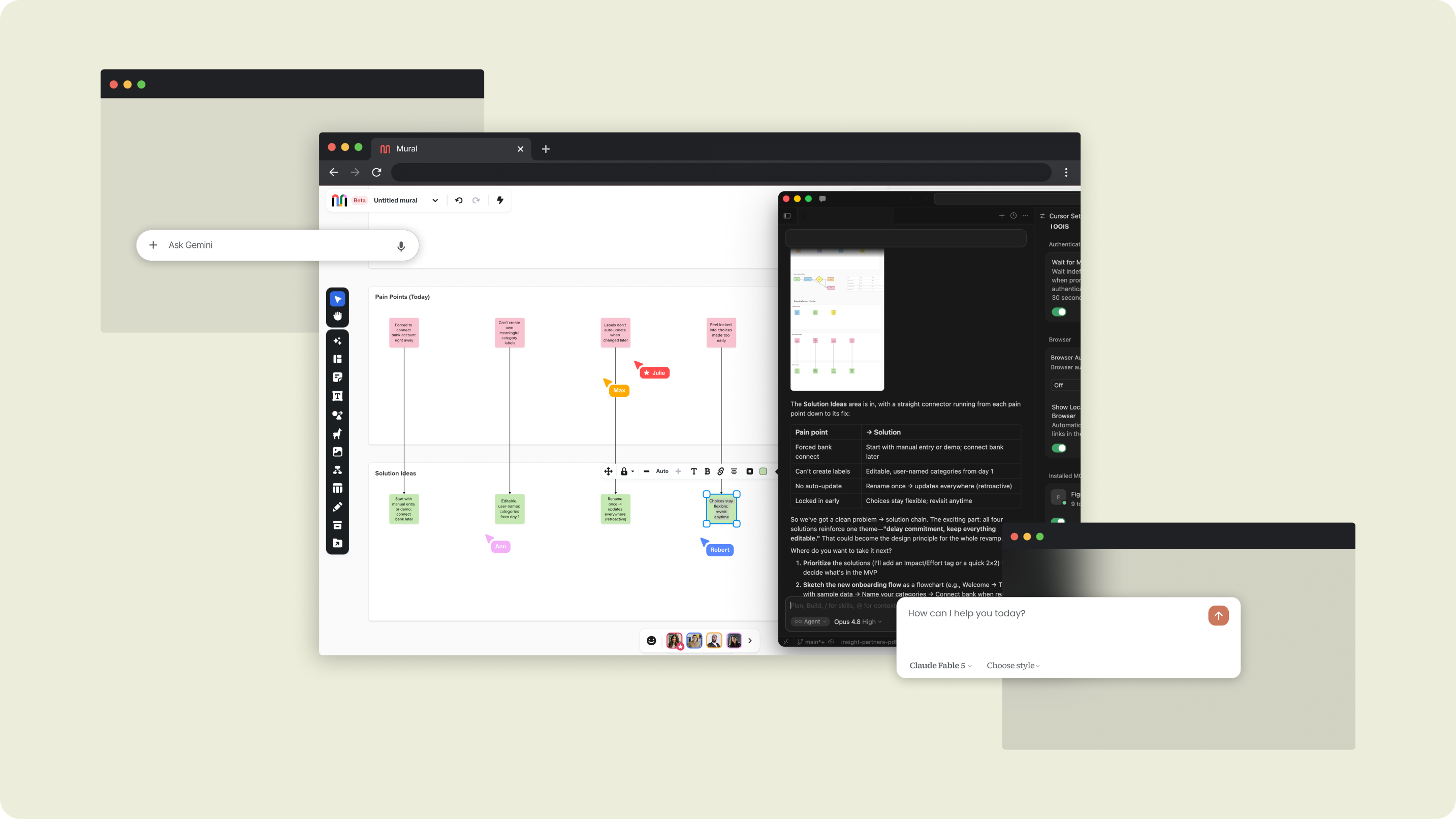
That creates workflows that can move in both directions. An agent can bring context from connected sources into Mural so a team has something concrete to react to. During the work, people can question, reorganize, annotate, and build on what's there. Afterward, an agent can read the canvas and carry decisions, summaries, or next steps into the tools where execution continues.
The canvas becomes more than a destination for AI-generated output. It becomes a shared working environment where people and agents can contribute to the same evolving context.
AI made it easier for individuals to produce more. The next challenge is making those capabilities useful to the whole team. That requires agents that can participate in shared workflows, context they can act on, and collaborative spaces where people remain at the center of how work is understood and decisions get made.
%20(1).webp)
%20(1).webp)


