

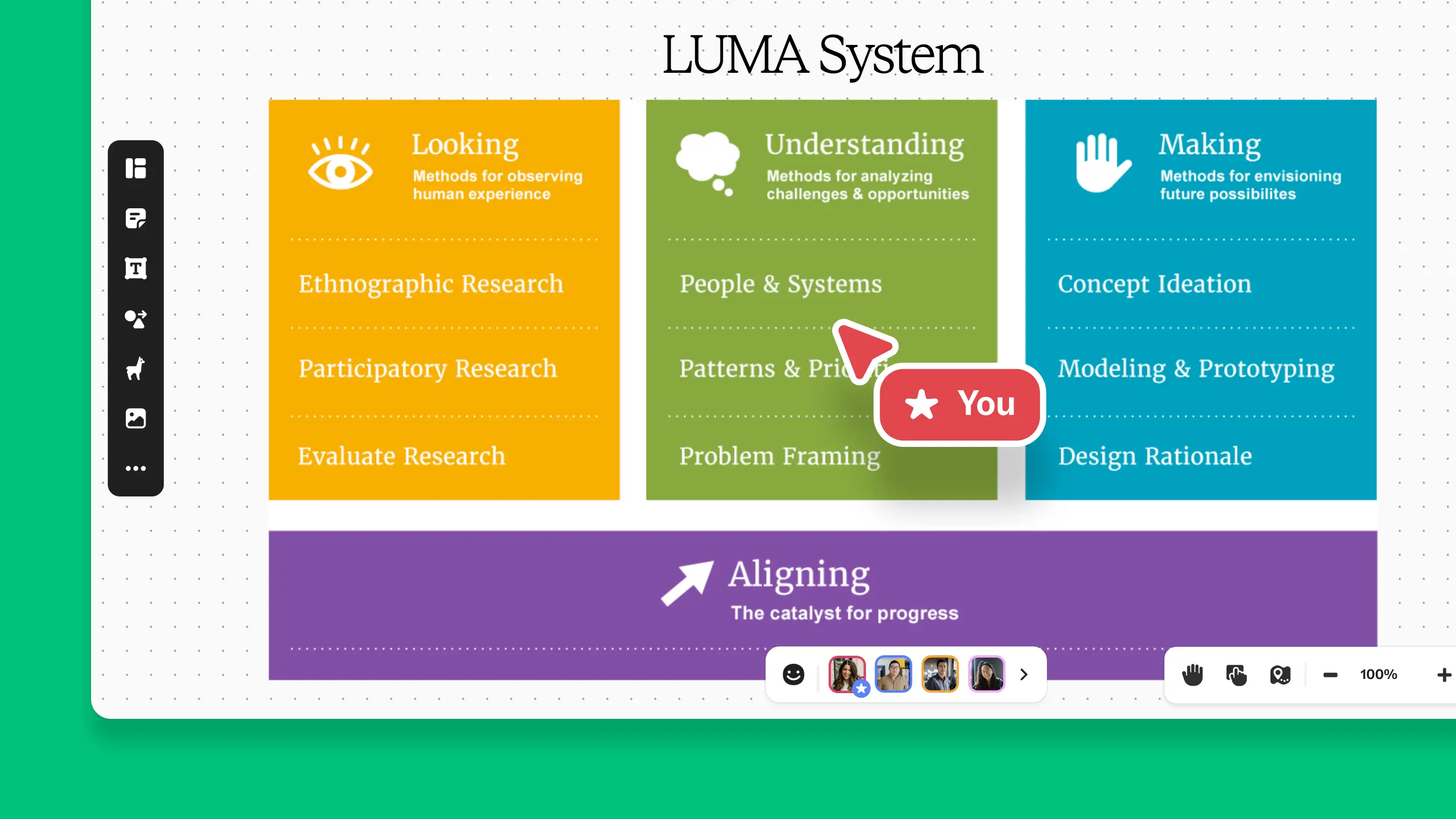
Say a product team is staring at 200 sticky notes from a week of customer interviews, a deadline next Friday, and three stakeholders with very different opinions about what the findings actually mean. Getting from that mess to a shared, confident decision is exactly the job LUMA System methods in Mural are designed to do. LUMA methods are a set of 36 human-centered design methods organized around three fundamental skills: Looking, Understanding, and Making. Originally developed by LUMA Institute, now a Mural company, the framework gives teams a shared language and a repeatable set of activities for solving problems with a human-centered approach.
What are LUMA methods and how teams use them in Mural
The LUMA System is a framework of 36 human-centered design methods that any team can learn and apply to everyday problem-solving. Using those methods inside Mural's visual workspace turns the activities into collaborative, durable artifacts that are easy to revisit, which is how teams get better alignment, clearer insights, and faster decisions.
What are the 36 human-centered design methods in the LUMA System?
Each method is a short, structured activity with a clear purpose: gather input, find a pattern, generate options, pick a direction. The methods are intentionally bite-sized. A team can use a on its own to answer a specific question, or chain several together into what LUMA calls a recipe to tackle a more complex challenge. That flexibility is why the system plays well with Agile, design sprints, lean processes, and ordinary Tuesday meetings.
What are the three LUMA design skills: Looking, Understanding, and Making?
The 36 methods are grouped into three fundamental design skills:
- Looking is about observing people, environments, and systems to gather firsthand insight. Methods include Interviewing, Fly-on-the-Wall Observation, and Think aloud testing.
- Understanding is about making sense of what was gathered. Methods include Affinity Clustering, Abstraction Laddering, and Rose, Thorn, Bud.
- Making is about turning insight into tangible artifacts that can be tested, critiqued, and refined. Methods include Concept Poster, Storyboarding, and Visualize the Vote.
How teams use the LUMA System in Mural for real workflows
A LUMA method is an activity; Mural is where the activity actually happens. Teams use LUMA methods in Mural because it captures every contribution in real time, ensures teams have shared context after the session ends, and makes it useful to teammates who weren't in the room. A practical sequence might look like this: an hour of Interviewing in Mural to capture raw research, an Affinity Clustering session the next day to synthesize it, and a Concept Poster session the following week to align on the direction heading into build. The output from each session becomes the input to the next, without anyone retyping a single sticky note.
How teams use LUMA methods across the three design skills in Mural
Sometimes teams move through Looking, Understanding, and Making in sequence, but it's a system, not a one-way funnel, so you can actually begin anywhere. For example, you might start with Problem Framing, which is an Understanding method or you might start with Brainstorming, which is a Making activity. The point is this: You can move through the system in any order that makes sense for your project. New questions surface at every stage and send you to the part of the journey.
Looking: capturing real-world insights in Mural
Most teams overlook or miss opportunities to develop Looking skills. The goal is to leave the building, literally or figuratively, and observe the people the work is meant to help. In Mural, building Looking skills typically centers on one method like Interviewing, Think Aloud Testing, or What's on Your Radar? Researchers drop notes, photos, and transcript clips directly onto the canvas as the work happens. Because the canvas is persistent, a second researcher joining the next day can pick up where the first left off without a handoff meeting. A concrete example: a customer success team running 10 churn interviews over two weeks can capture every call summary on the same Mural, then sort notes by account segment at the end. What used to be a spreadsheet exercise becomes a visual pattern the whole team can see.
Understanding: making sense of insights with your team
Understanding is the synthesis step, and it's where most insights quietly die when not understood. The methods here (Affinity Clustering, Problem Tree Analysis, Rose, Thorn, Bud) are all about turning raw observations into a shared interpretation. Mural's infinite canvas is purpose-built for this.
Team members cluster sticky notes, draw connections between them, and use voting to quickly surface the ideas with the most traction. Mural AI can accelerate the heavy lifting: automatically grouping similar notes, summarizing a cluster in a sentence, or surfacing themes across hundreds of data points. It doesn't replace the team's judgment. It removes the manual step that kills momentum at 4 p.m. on a Thursday.
A concrete example: a marketing team reviewing 300 customer quotes from a campaign retrospective can use an Affinity Clustering template with AI-assisted grouping and reach a working theme map in 20 minutes instead of three hours.
Making: turning ideas into tangible solutions in Mural
Making is where ideas become something a team can react to. The methods are biased toward rapid, low-fidelity artifacts: sketches, Concept Posters, Storyboards, quick prototypes. In Mural, the making is where alignment transforms into action. When a team sketches three concept directions onto a single canvas and three meetings (ideate, document, decide) compress into one working session. The artifact the team leaves with is both the decision and the record of how it was made.
How to apply the LUMA System in Mural step by step
Most teams get the most value from a simple, repeatable three-step workflow. Each step in this workflow maps directly to one of the three LUMA categories: you gather before you synthesize, and you synthesize before you make. That sequence isn't arbitrary, it's where the discipline lives, and it starts in Step 1.
Step 1: Gather inputs and observations using Mural
Pick one Looking method that matches the question at hand. To understand what users need, start with Interviewing. To map who has influence over a decision, start with Stakeholder Mapping. Create a Mural from the relevant template, invite the team, and run the session. The key discipline is to capture raw observations, not interpretations. One note, one observation. If a customer said "the setup took forever," that's the note. "Users hate our onboarding" is interpretation and belongs in Step 2.
Step 2: Synthesize insights collaboratively in Mural
Bring the team back to the same Mural and run a synthesis method. Affinity Clustering is the workhorse: group related notes, name each cluster, and see which themes carry the most weight. Abstraction Laddering helps when the problem itself needs to be reframed. Rose, Thorn, Bud is useful when synthesizing a retrospective or a mixed bag of signals. If the team is collaborating using LUMA methods in Mural, this is also where Mural AI earns its keep, clustering similar notes, drafting theme labels, and pulling patterns out of long-form text so the team spends its time debating what the patterns mean instead of organizing sticky notes.
Step 3: Turn ideas into clear next steps and actions
Move to a Making method that forces a decision. Concept Poster is good for communicating a single direction clearly. Storyboarding is good when the answer is a sequence (a user flow, an onboarding journey, a sales motion). Finish the session with an explicit action block on the Mural: who owns what, by when. The canvas stays live, so when someone asks two weeks later "why did we decide this?" the answer is one click away.
Examples of LUMA System methods in Mural workflows
The examples below show how teams use LUMA methods to bring structure and momentum to collaborative work in Mural. Each method helps teams move through a different stage of problem-solving, from gathering perspectives and uncovering insights to aligning on priorities and next steps.
Examples of LUMA methods for gathering input
The best way to understand how this works in practice is to see the methods in action. I find it helps to anchor each one to a real team situation, because LUMA methods aren't abstract frameworks, they're tools you reach for when a specific problem is in front of you. Below are examples across all three categories: gathering input, making sense of what you found, and aligning on what to do next.
- Interviewing for a product team running discovery calls with five target customers, with each transcript captured on the same canvas.
- Stakeholder Mapping for a sales team planning a multi-threaded enterprise deal, visualizing champions, blockers, and gaps before the next meeting.
- What's on Your Radar? for a leadership team ranking strategic priorities by relevance in a quarterly planning session.
Examples of LUMA methods for making sense of insights
- Affinity Clustering for a UX research team synthesizing three weeks of usability testing into clear themes.
- Problem Tree Analysis for an operations team trying to find the root cause of a recurring customer escalation.
- Abstraction Laddering for a marketing team stuck on tactics that needs to zoom back out to the actual goal.
Examples of LUMA methods for aligning on decisions
- Concept Poster for a founder pitching an early product direction to advisors without building a deck.
- Storyboarding for a customer success team mapping the ideal onboarding experience before handing it to engineering. Every method above has a ready-to-use template in the LUMA System template library.
Why teams use LUMA methods in Mural for collaborative problem-solving
The combination of LUMA and Mural does more than make individual workshops easier to run. The more important payoff is organizational, it changes how teams relate to problems, to evidence, and to each other. Three things stand out in particular:
Scaling human-centered design across teams
The reason the LUMA System exists is that human-centered design works, but it doesn't scale naturally. A single design thinker can run a great workshop; an organization of 5,000 people cannot replicate that by osmosis. LUMA turns a discipline into a set of named, teachable methods anyone can run. Mural turns those methods into digital artifacts any team can access, remix, and improve on. Together, that's what makes human-centered design something an organization can actually operationalize, not just endorse.
Keeping work focused on real user needs
The methods share a bias: they pull the team back toward the people the work is for. Interviewing forces the team to hear actual words from actual users. Affinity Clustering forces the team to respect the pattern in the data rather than the story it wanted the data to tell. Concept Poster forces the team to describe the solution in terms a user would recognize. Running these methods in Mural makes that discipline visible. Everyone sees the inputs, the synthesis, and the decision in the same place, so "the user" stops being an abstraction that drifts between meetings.
Creating a shared system for collaborative problem-solving
Teams don't need more tools. They need a shared system. LUMA gives teams a common vocabulary (Affinity Clustering means the same thing in marketing as it does in engineering). Mural gives teams a common canvas. Together they produce collaborative problem-solving methods that travel, so a workshop run by the research team in Austin can be picked up and extended by the product team in Berlin without a translation layer.
How to get started with the LUMA System in Mural
Getting started with the LUMA System in Mural doesn't require a training program, a dedicated facilitator, or a full team onboarding. The entry point is deliberately low: one method, one session, one problem that's already on the team's plate. From there, the path forward builds on itself, each session making the next one easier to run and easier to trust.
Start with one LUMA method or recipe
Resist the urge to roll out the whole system at once. Pick one method that solves a problem the team already has this week. Just finished a research round? Run an Affinity Clustering session. A project losing focus? Run Abstraction Laddering. The goal of the first session is to give the team one clear win it attributes to the method.
Pro-tip: Sign up for LUMA Workplace to explore design recipes, get expert tips, and take the guesswork out of session planning.
Use a Mural template to guide your first session
Every LUMA method has a matching Mural template. Each template includes everything you need to get started quickly. Think of the template as your co-facilitator.
Pro-Tip: LUMA Workplace’s Session Planner makes it easy to design meeting agendas using collaboration design practices, timeblock sessions, and manage timing with ease.
Build repeatable workflows over time
After three or four successful sessions, start combining methods. A simple recipe: Interviewing (week 1), then Affinity Clustering (week 2), then Concept Poster (week 3). Once that recipe feels natural, it becomes a team default, the way the team turns a problem into a decision. That's when the LUMA System in Mural stops being a tool and starts being a way of working.
Ready to run your first LUMA session?
Open a LUMA System template in Mural and use your first method this week. For leaders rolling out human-centered problem-solving across teams, book a demo to see how Mural's enterprise features support LUMA methods at scale.
%20(1).webp)
%20(1).webp)


