

Watch the webinar here: Watch Innovation & AIignment: Inside Mural AI for the full demos and perspectives from Mural, Inflection, and Databricks.
“A transcript is a record, but it isn't really shared understanding.”
That observation from Mural Principal Product Manager Ian Beatty captures a growing problem with AI-assisted work. That is, producing information has become easier, but getting a team to act on it remains difficult.
You can ask an assistant to research a problem or develop a plan in minutes. Then comes the familiar work of bringing colleagues up to speed. They need the context behind the recommendations, a chance to question assumptions, and a way to carry decisions forward.
Individual productivity is accelerating. Teamwork hasn't necessarily kept pace.
Bridging this disconnect was the central theme of Innovation & Alignment: Inside Mural AI, featuring Chief Product Officer Elaina O'Mahoney, Mural product leaders, and guests from Inflection and Databricks. The webinar introduced new capabilities and explored how AI-generated work can become shared work.
As O'Mahoney put it, Mural is focused on the shift “from AI that helps one person to work faster to AI that helps teams get aligned and stay aligned.”
Give AI-generated work a place in team workflows
Mural MCP, now available to users on all plans, helps close that gap by connecting AI assistants like Claude and ChatGPT directly to the Mural canvas. Agents can create, organize, read, and summarize content in the same shared workspace where teams collaborate.
During the webinar, Mural Product Manager Olivia Hartle demonstrated how this changes a familiar workflow. Working in Claude, she asked her assistant to gather research and other materials for a fictional product launch, then organize them into a central hub in Mural.
Next, she asked Claude to prepare a 30-minute team alignment session. Drawing on LUMA's human-centered design methods, the agent created a structured agenda populated with relevant project context.
Scattered information became the foundation for a productive team discussion. The agent handled much of the preparation, leaving participants free to concentrate on the decisions that required their expertise.
More importantly, that work was no longer confined to Hartle's AI conversation. Her teammates could review the materials, contribute their perspectives, and decide together what should happen next.
Keep the plan connected to execution
Inflection CEO Aaron Bird and Alicia Wilson demonstrated how that principle extends into execution.
Bird described a familiar problem. Teams develop plans collaboratively, then move into another system to execute them. Somewhere along the way, the original intent gets lost.
"As soon as you make that transition, your plan has now become stale," Bird observed.
A marketing team might collaborate on a campaign in one environment, then rebuild it in another. Each handoff invites interpretation and drift. What eventually ships may no longer reflect what the team approved.
Bird and Inflection's Alicia Wilson showed an alternative using Mural MCP and Inflection MCP. An agent reviewed product updates and audience context, then drafted tailored announcement emails for five audience segments. The versions appeared in Mural, alongside explanations of the agent's choices, so marketers could collaborate on the actual copy.
Once approved, the agent built the email assets and campaign journey in Inflection, ready for final QA. The connection between planning and execution creates fewer opportunities for the work to change meaning between discussion and delivery.
It also broadens participation. Marketers can shape campaigns directly while Inflection handles execution and governance. As Bird put it, “Anyone can build on the marketing platform now.” The expertise needed to make a good campaign isn't limited to the people who know the automation software best.
Turn meeting conversations into shared understanding
Even when a team shares its source materials, much of the reasoning happens in conversation. A transcript preserves the words, but finding (and understanding) the decision that matters can still mean combing through an hour of discussion.
Beatty introduced Mural Compose, showing how it captures conversations and turns them into visual summaries on the canvas. Related meetings accumulate in threads, giving teams a running account of a project instead of disconnected meeting records. Someone who missed a session can ask what changed and find an answer linked to the transcript.
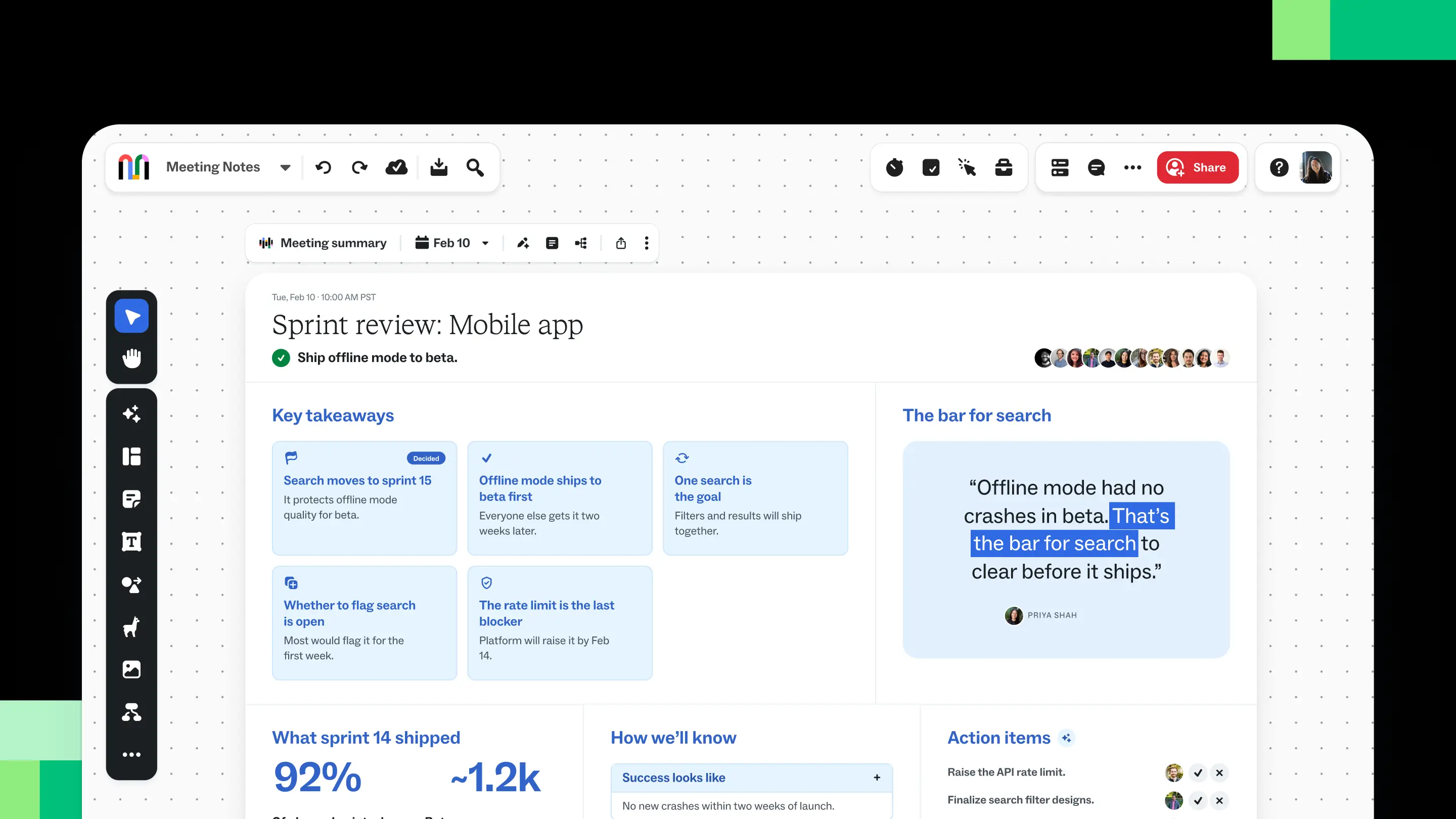
After a meeting, Compose generates an editable visual alignment summary that participants can send directly to Mural. Rather than another wall of text, the summary organizes information around what the team needs to understand, including key decisions, takeaways, and next steps.
Because it lives alongside the team's existing work, participants can correct details and keep the information current as plans evolve.
Give decisions a life after the meeting
Beatty also demonstrated live tables, which turn meeting action items into structured records with owners, statuses, and due dates. The team can update those records as work advances.
Live tables also help teams evaluate competing ideas. In the demonstration, a fictional product team had gathered several suggestions from beta customers but couldn't pursue them all before launch. Beatty moved those ideas into a live table, where the team could compare impact and effort, then decide what deserved attention now or later.
The distinction is between keeping evidence that a conversation happened and keeping the result of that conversation useful. When priorities change, the team can update the shared work rather than hunting through old notes to understand its own decisions.
Mural Compose, alignment summaries, and live tables are coming soon. Join the waitlist for early access.
Bring every participant into the conversation
Shared context becomes especially important when some collaborators are physically together and others join remotely.
Picture a workshop where participants are moving sticky notes around a wall, debating priorities, and building on suggestions. The people in the room can see the work taking shape and influence it directly.
Remote participants may have a different experience. Even with a camera pointed at the wall, contributing can be difficult when the ideas themselves aren't accessible.
“If you're in the room, it works. If you're not in the room, it doesn't work,” observed Dustin Stiver, Director of Design at LUMA.
Stiver demonstrated Convert with Mural AI by photographing physical sticky notes and turning them into editable notes on the Mural canvas. He then used LUMA's Bull's-eye Diagram method to prioritize the ideas with participants in the room and online.
The time saved on transcription is useful. More impactfully, when ideas become accessible during the session, remote colleagues can participate in shaping the work as it develops. For facilitators, less time transferring information means more attention can go toward helping the group reach an outcome.
Once the session ends, the shared canvas remains available for the next round of work. A workshop's ideas don't have to be recreated before the team can act on them.
Make AI adoption a team-level decision
Bringing AI into collaborative workflows creates new opportunities for teams. It also raises questions for the people responsible for supporting them across an organization.
Where is AI being adopted? Which departments are developing useful practices? Who has experience that could benefit other teams?
In a conversation with Mural Product Marketing Lead Katie Turner, Databricks' Brian Smith explored why high-level usage numbers provide only part of the picture. An active department might be experimenting without changing how it works; a smaller team might have developed a practice worth sharing.
Mural's Customer Insights dashboard, now generally available to Company Admins, offers visibility into organizational activity, collaboration patterns, and AI feature use. Turner demonstrated how admins can examine use cases across departments and identify frequent collaborators.
Imagine discovering that one team uses Mural heavily for onboarding. That doesn't prove the approach is effective. It gives an administrator somewhere specific to investigate: Who is involved? What does the workflow look like? Could other groups benefit from learning about it?
Databricks provides part of the governed data foundation behind Customer Insights, helping bring together organizational activity signals with appropriate controls.
The value of that visibility lies in what leaders do next. Instead of treating adoption as a one-time rollout, they can learn from emerging practices, connect experienced users with others, and direct support where it might make a difference.
The next chapter of AI is collaborative
Across these examples, the opportunity is bigger than reducing the time spent preparing meetings or building campaigns. It's keeping useful work connected to the people and decisions that give it meaning.
AI can gather context and accelerate execution. Teams still need to challenge assumptions, agree on priorities, and follow through. Making those contributions visible and reusable is how individual productivity becomes collective progress.
See the ideas in action. Watch Innovation & AIignment: Inside Mural AI for the full demos and perspectives from Mural, Inflection, and Databricks.


