

.avif)



.avif)

Teams already use AI tools to summarize research, generate ideas, and work through complex information. Mural MCP brings those capabilities into the Mural canvas, so teams can turn AI-generated work into something visual, collaborative, and easier to build on together.
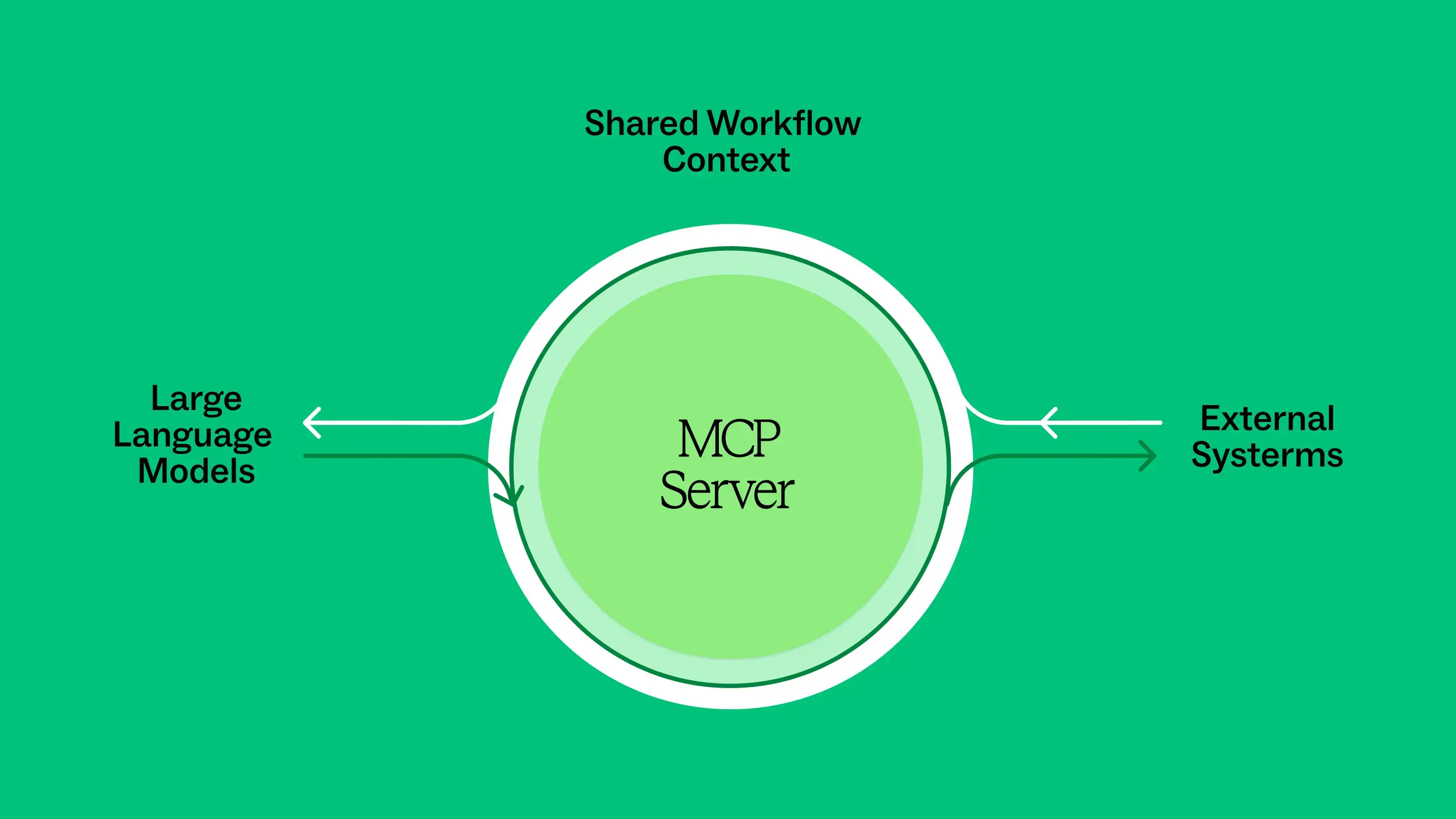
Mural MCP Server connects compatible AI tools with the Mural canvas. Teams can use those tools to bring information into Mural, create and organize content, and work with what is already on the canvas as the work evolves. Instead of leaving useful AI output in a separate chat, teams can turn it into collaborative work they can build on together.
Mural MCP reduces the manual work of bringing AI-generated ideas and synthesis into a visual workspace, while the team remains responsible for interpreting the work, setting priorities, and making decisions.
Mural MCP Server is currently available through Public Preview on paid plans.
What can teams do with Mural MCP?
Mural MCP expands what teams can do in Mural by connecting the AI tools they already use to the canvas, so they can bring in research, project notes, customer feedback, planning materials, and other information without manually rebuilding it in Mural.
Teams can use Mural MCP to:
- Create a canvas for a project, planning session, or initiative
- Bring research, notes, ideas, and other information into the workspace
- Structure content into meaningful sections and groups
- Synthesize research or team input into a shared view
- Organize options and priorities for team review
- Capture decisions, action items, and next steps
- Create tickets, share decisions, or move next steps into other systems the AI tool can access
The key difference is that AI output becomes part of the team's working environment. People can review what was created, add missing research or project details, reorganize information, and continue from the same shared view.
For more background on the technology itself, read What are MCP servers and how do they work?.
Create and organize collaborative work
Consider a product team starting a planning cycle with research, customer feedback, open questions, and notes from the team spread across multiple systems.
The AI tools a team already uses may have access to much of that information. With Mural MCP, teams can bring it directly into the canvas and turn it into a shared visual starting point instead of manually rebuilding an AI response.
Teams can use their AI tools to create and organize content directly on the canvas using elements such as stickies, shapes, text, connectors, and areas. They can also place related information together, create sections for different topics, and organize the workspace so relationships are easier to see.
Because the AI tool can work from the current canvas state, teams can continue using it as the collaborative work evolves instead of treating each request as a one-time output.
Synthesize input and support team decisions
Using Mural MCP can reduce the manual work of synthesizing and structuring research findings before the team makes sense of them together.
With Mural MCP, teams can use their AI tools to group similar ideas, identify recurring themes, summarize research, surface open questions, or arrange options against defined criteria. That initial organization makes the information easier for the team to review, challenge, and refine.
For example, a team evaluating product opportunities could bring research findings into Mural, cluster them by theme, and organize potential opportunities for review. The agent can make the information easier to work with, but the team determines whether the patterns are meaningful and which tradeoffs should influence the decision.
Once the team has aligned on priorities, the same workspace can capture what was decided, why it matters, and what should happen next.
If the agent also has access to downstream systems, it can use that shared canvas context to help move approved outcomes into the tools where execution continues.
Mural MCP brings the capabilities teams already use in AI tools into a visual environment built for collaborative work. Research, documents, project information, and other inputs can be organized on the canvas, where the team can see relationships, compare options, and make decisions together. If the AI tool also has access to downstream systems, those decisions can then move into the tools where execution continues.
See Mural MCP in action
A research team has completed a set of customer interviews and now needs to turn dozens of findings into a smaller set of priorities.
An AI agent can summarize those findings quickly, but a text summary is still difficult for a team to explore together. Themes, relationships, contradictions, and open questions are much easier to evaluate when people can see and reorganize them visually. Without Mural MCP, someone still has to manually translate the agent’s synthesis into a shared visual workspace before the team can work with it together.
With Mural MCP, the agent can bring that synthesis directly into Mural and organize it in a structure designed for collaborative work.
- Ask your AI tool to synthesize the research in a Mural template.
Start with interview notes, transcripts, survey responses, or other research available to your AI tool. Ask it to bring the findings into Mural, organize them into a relevant template, and create a structured starting point for the team. - Use a structured method to surface themes and questions.
The AI tool can group related findings, populate sections of the template, and identify recurring patterns or open questions. A LUMA method or another structured template gives that synthesis a visual framework the team can work with. - Review and refine the synthesis together.
The team validates the groupings, moves content, adds missing information, and challenges interpretations that do not match the evidence. - Prioritize the most important opportunities.
With the research visible and organized, collaborators compare opportunities, discuss tradeoffs, and decide where to focus. - Turn approved priorities into next steps
Capture decisions, owners, and actions on the canvas. If the AI tool also has access to Jira, for example, it can use those approved actions to create the relevant tickets.
The agent handles more of the setup and synthesis, while Mural gives people the space to see the work, challenge it, reshape it, and make the decisions that move it forward.
Explore Mural MCP
Mural MCP expands what teams can do in Mural by bringing the capabilities of the AI tools they already use directly into the canvas.
Teams can use those tools to bring research, notes, project information, and other material to their canvases, then organize and synthesize it visually in Mural. Instead of copying an AI response into the canvas and rebuilding it by hand, you can use familiar AI capabilities where the team is already working together.
Mural MCP Server is currently available through Public Preview on paid plans. Find out if it’s right for your organization.
%20(1).webp)
.webp)
.webp)




%20(1).webp)