

%20(1).webp)
What makes a sales presentation engaging? It combines clear storytelling, interactive elements, and a sharp focus on buyer needs to hold attention and drive decisions.
You’ve done the slide deck and a pitch dance a million times, talking at your prospect instead of with them (if it doesn’t feel exciting to you — believe us — they’re feeling the same way). What if, during your presentation, your prospect was able to change it? Perhaps add to it? Or even…partner with you on it?
Today's buyers expect more in their presentations. With 6 to 10 stakeholders involved in the average B2B deal and sales cycles taking 60% longer than five years ago, your presentation needs to be elevated; it needs to create alignment, spark conversation, and push the room toward a decision.
This guide covers practical sales presentation tips to help you create interactive, buyer-focused presentations that stand out and convert. Whether you're running a discovery call, a quarterly business review, or a final proposal, these strategies will help you keep prospects engaged and close deals faster.
Why many sales presentations aren't engaging (and how to fix them)
How many times have you seen a great product overshadowed by a poorly executed presentation? Too many, we’d guess. Here are the most common reasons sales presentations miss the mark:
Not understanding your audience. If you don't know what matters to your buyers, their pain points, or what challenges they face, your message will fall on its face. Tailoring content to their specific needs is essential.
Information overload. Too much data or too many details can overwhelm your audience. Focus on delivering clear, concise points that highlight what matters most to them.
Lack of storytelling. People remember stories more than facts. Without a narrative that illustrates how your product solves a real problem, your presentation can feel flat and forgettable. So create some characters, and give them a journey!
Focusing too much on features. It's easy to fall into the trap of listing what your product does. What matters more is how it benefits your buyer and addresses their specific challenges. Speak to their pain points.
Poor visuals. This is a big one. Cluttered or text-heavy slides distract from your message. Clean, simple visuals that reinforce your key points are far more effective.
Lack of interaction. Think about how you react when someone talks at you for a long time. Right. A one-way monologue won't hold attention for long. Interactive sales presentations keep your audience engaged by inviting questions and encouraging discussion throughout.
Pushing the sale too hard. People buy from those they trust. If your presentation feels like a hard close rather than an opportunity to build a relationship, it can backfire.
Tips on how to create interactive sales presentations that convert
Creating a great, impactful sales presentation means listening to your audience, keeping them involved, and guiding them toward a clear action. Here are sales presentation tips to make your next pitch more interactive and buyer-focused:
1. Tailor the content to your audience
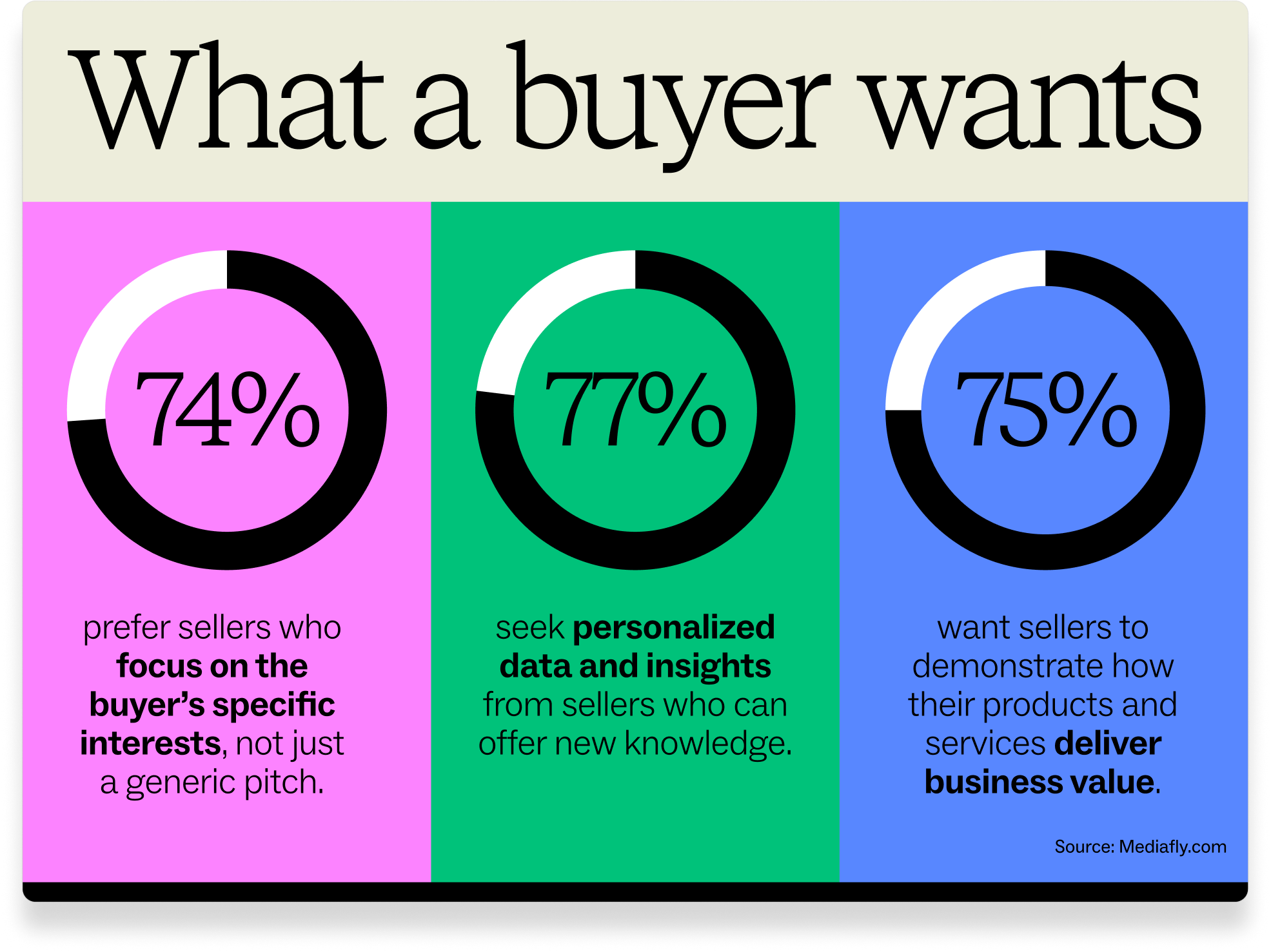
Do your research: Understand your audience's challenges, goals, and pain points before you build your presentation. Use this insight to customize the content so it feels relevant and personal.
Ask questions early: The best way to keep prospects engaged is by asking questions. Start with something like, "How are you currently handling [specific problem]?" This creates an interactive dynamic from the start and helps you confirm your content is relevant.
2. Use interactive technology
Polls and surveys: Tools like Mentimeter, Slido, or Poll Everywhere let you engage the audience in real time with live polls or surveys during your presentation.
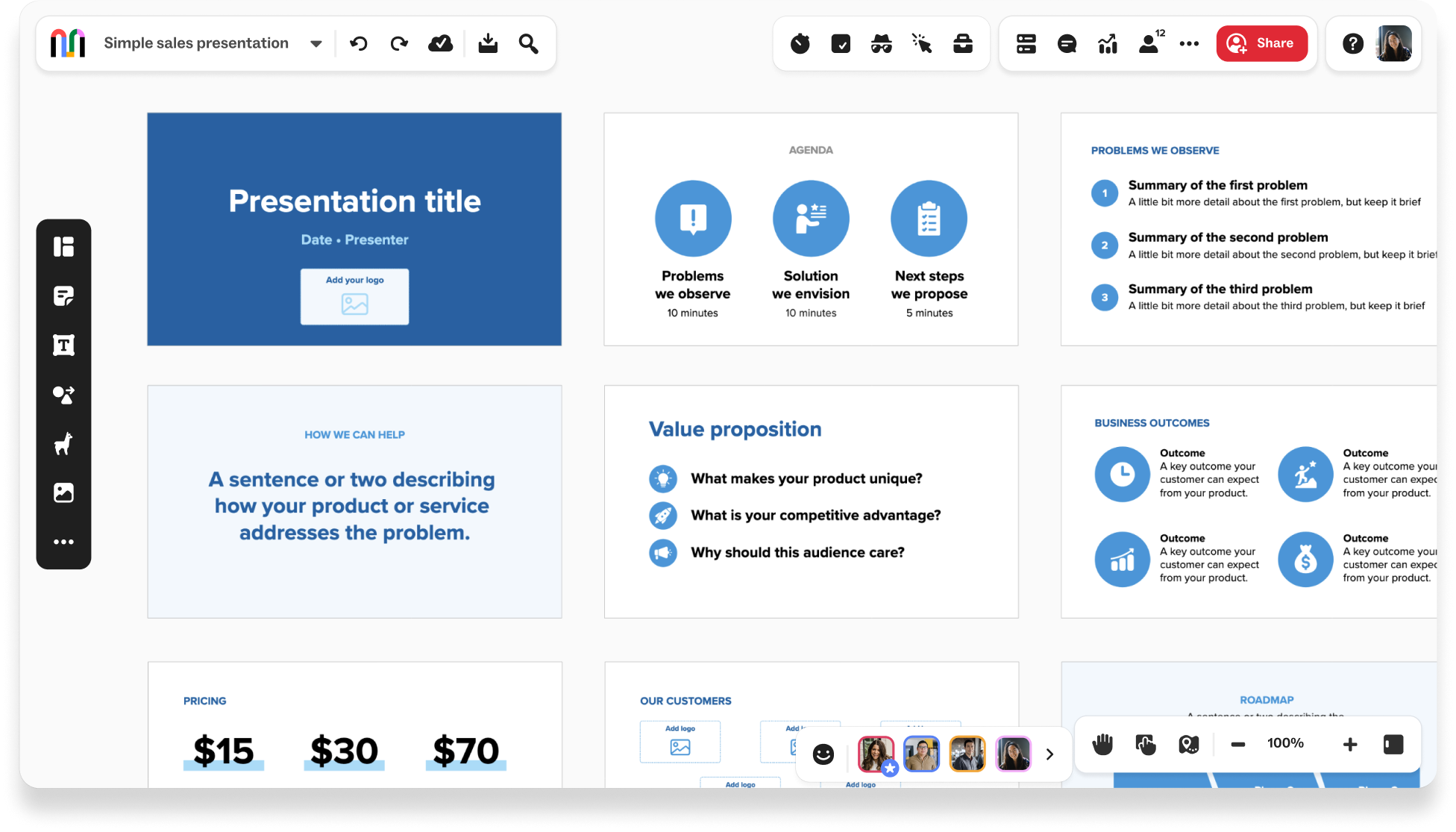
Interactive slides: Use visual collaboration platforms like Mural to create dynamic presentations your audience can join in real time. This encourages exploration and gives buyers control over how they interact with your content.
3. Use storytelling to connect
Frame your presentation as a story: A good story makes your audience care about the journey and outcome. Use data-driven storytelling to show how your product leads to real results. Illustrate how your solution solves problems in ways the buyer can relate to.
Include case studies and testimonials: Integrate relevant success stories that involve people like your audience. When buyers see someone similar benefiting from your solution, they're more likely to engage.
4. Focus on visuals that enhance interaction
Make visuals interactive: The best visual sales presentations aren't static slides. Infographics, charts, and videos should tell a story visually. Interactive elements like clickable product demos or live data presentations hold attention better than static content.
Keep text minimal: Avoid overwhelming your audience with walls of text. Use high-impact visuals and concise points to communicate your message in a way that's easy to absorb.
5. Show your product in action
Live demonstrations: Rather than just talking about your product, show it working. Live demos grab attention and let you adapt based on the audience's feedback and questions.
Ask for feedback: After showing a feature, ask how it could help their specific situation. This encourages participation and builds a stronger connection to your solution.
6. Incorporate personalized data and insights
Custom data: Show your audience how your solution directly impacts them by including personalized data like their current metrics, industry trends, or benchmarking comparisons. This is especially valuable for quarterly business reviews.
Tailored insights: Use insights relevant to the buyer's business or industry. Sharing specific information meaningful to them makes your presentation feel custom-built and more impactful.
7. Tie everything back to business outcomes
Focus on results: Always connect your solution to the tangible business outcomes it delivers. Whether it's increasing efficiency, reducing costs, improving customer satisfaction, or boosting revenue, your audience needs to understand how your product drives their success.
Quantify the impact: Use real numbers, percentages, and concrete examples to show how your solution will positively affect their business. This helps buyers visualize the direct impact on their bottom line.
8. Stay flexible
Adapt to change: Don't be precious with your content. Your buyer might look at your first few slides and tell you it's not relevant to their situation. Listen to them and let them guide the conversation. The ability to pivot shows you're focused on their needs, not your script.
9. Provide clear next steps
Interactive calls to action: Don't end with a generic "contact us." Use interactive elements like booking a one-on-one demo, scheduling a follow-up meeting, or completing a quick action like downloading a resource.
Offer choices: Let your audience choose what comes next, whether it's a deeper dive into a specific feature or exploring pricing options. Giving them control increases engagement and trust.
10. Follow up with personalized content
Stay aligned: After the presentation, send follow-up emails with personalized content based on the conversation. Include summaries, additional resources, or custom offers to maintain engagement and move the relationship forward.
How to present sales data in a compelling way
1. Understand your audience
Before you present sales data, understand who you're presenting to and what their priorities are. Whether it's senior executives focused on revenue growth during a quarterly business review or a marketing team interested in campaign performance, tailor your data to their needs.
2. Start from an interactive template
Static slides are outdated. Use an interactive sales presentation template to create compelling, customer-focused pitches that are memorable. Interactive canvases allow live co-creation with customers, and AI-powered tools can help you generate and organize content faster.
3. Begin with a story
What's the problem your buyer is trying to solve? Key in on their pain point and ask questions up front. That way, you know if the information you're about to present is relevant.
Visual representations help great sales presentations stand out. Line charts work well for trends, bar charts for comparisons, and pie charts for proportions. Choose the right type of visualization for the message you're trying to convey.
4. Share actionable insights
Use data to demonstrate benchmarks and provide recommendations. For example, "Based on the sales performance in Region A, we recommend focusing more resources on marketing there to continue the growth trend."
Data alone doesn't drive decisions. Your insights should guide the audience toward the next strategic move.
5. Keep the focus on outcomes
Focus on a few key takeaways rather than presenting every detail. Highlight the most important aspects that align with your overall message and objective.
Throughout the presentation, keep coming back to the outcomes your buyer is looking to achieve. For example, if their goal is to reduce overhead costs, keep driving the point back to long-term savings.
6. End with clear next steps
End with a strong, memorable conclusion that ties the data back to your objectives. Summarize the key findings, reiterate the action steps, and leave your audience with clear expectations and a sense of direction.
Using Mural to create more engaging sales presentations
When you make sales presentations more interactive and visually compelling, you capture attention and ensure your message resonates long after the meeting ends. The ability to collaborate in real time and actively involve your audience creates engagement and trust, which are essential for closing deals.
Mural helps sales teams build presentations that do more than inform. With Presentation mode, you can transform your working canvas into a clean, focused stage, navigate smoothly between topics, and keep the spotlight on what moves the conversation forward. Tools like the Laser pointer, Timer, and Summon feature help you guide attention, pace the discussion, and keep every participant aligned.
Mural AI takes it further by helping you generate ideas, organize content, and turn insights into clear visuals faster. Whether you're preparing a discovery call, a QBR, or a final proposal, AI-powered features like clustering and mind mapping help you build buyer-focused content that adapts to the conversation.
Request a demo now and discover how Mural can help you deliver sales presentations that drive real results.


