What is AI Clustering?
AI Clustering groups sticky notes in your mural based on shared content themes. Select a set of sticky notes, run AI Clustering, and Mural AI identifies patterns and organizes them into labeled groups. Work that might take your team 30 minutes happens in seconds.
Part of the Mural AI suite, AI Clustering works alongside Summarize (to distill themes into key takeaways) and Classify (to sort by sentiment) so your team can move from divergent thinking to converged decisions faster.
Why we built AI Clustering for R&D teams
For R&D teams, one of the slowest steps in the product cycle is making sense of qualitative data: sticky notes from brainstorms, interview transcripts, usability feedback, retrospective insights. Manual affinity mapping can be tedious and subjective. Two people looking at the same wall of sticky notes will group them differently, and neither has time to argue about it.
AI Clustering gives your team a consistent starting point. It handles the first pass of organization so you can spend your time aligning on your next action items, not which sticky note belongs where.
What's new in Mural’s AI Clustering
Preview Mode: You can now preview AI-generated clusters before committing them to your canvas. Reposition the entirety of the clustered results, evaluate the groupings, and accept or discard. This gives you control over the final arrangement without undoing work.
Custom titles preserved: When you add your own titles to clusters, they stay exactly as you wrote them. Your categories appear the way you intended, without AI changing or suggesting new names.
AI Clustering helps you
Reduce synthesis time
Stop wasting time dragging sticky notes into piles. AI Clustering handles the initial organization so your team can start discussing themes immediately.
Surface patterns you might miss
When you're close to the work, it's easy to overlook connections. AI Clustering can identify themes across hundreds of sticky notes that a tired team might not catch at the end of a long research sprint.
Keep your framing intact
With custom title preservation, your team's language stays front and center. Name your clusters in terms that match your product strategy, customer segments, or sprint goals.
Refine before you commit
Preview Mode lets you evaluate AI-generated clusters and finalize them once you’re satisfied. And you can use AI chat to refine clusters (like update their titles, make more/fewer clusters). No more undoing bulk changes that didn't quite land.
How to use AI Clustering
Step 1: Select your sticky notes
Draw a selection box around the sticky notes you want to cluster, or Cmd/Ctrl+click to select specific notes. AI Clustering works best with more than a few sticky notes. The more input, the clearer the themes.
Step 2: Open AI Clustering from the toolbar
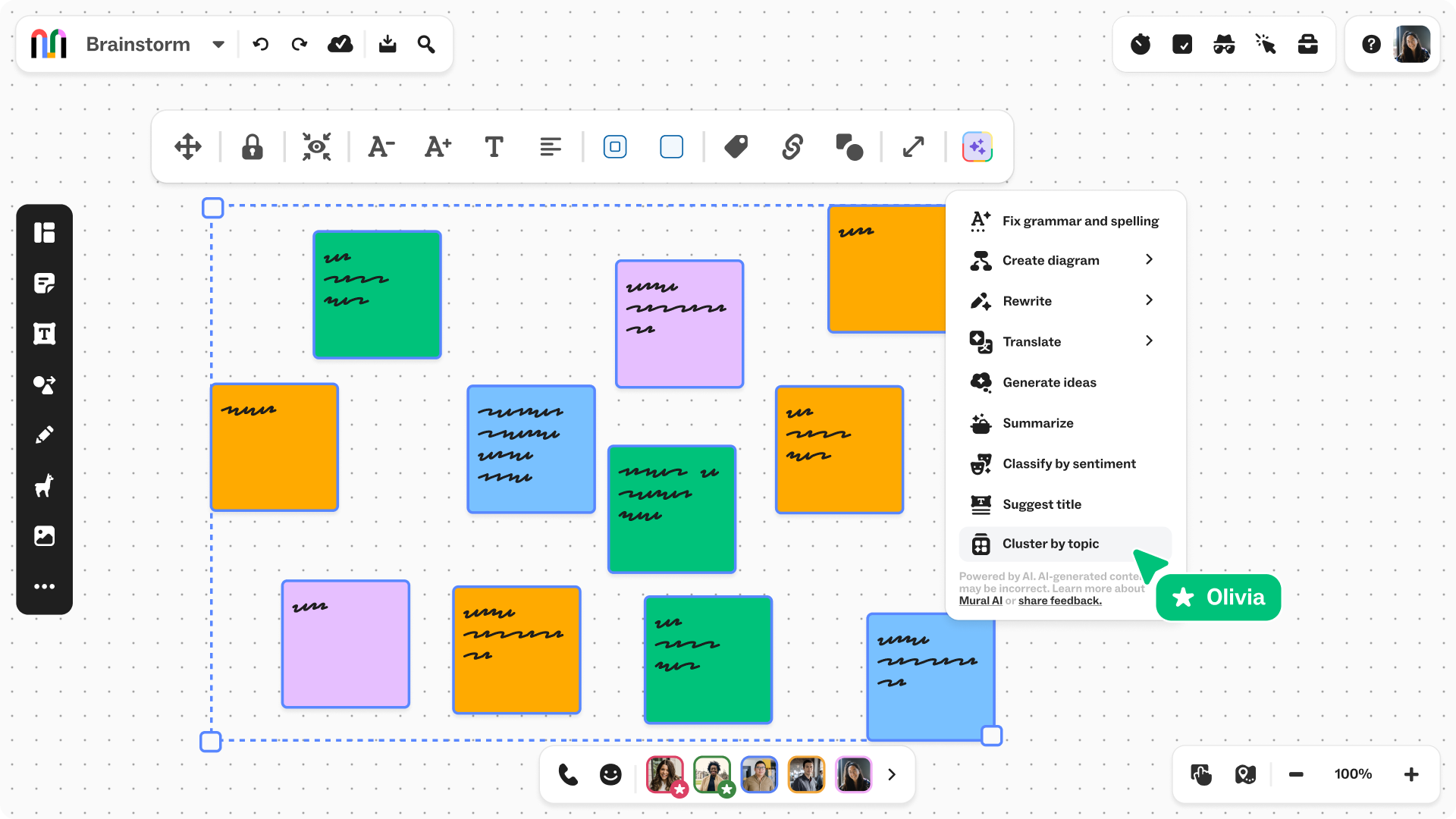
With your sticky notes selected, click the AI menu in the toolbar and select Cluster by topic. Mural AI analyzes the content and groups notes by theme.
Step 3: Preview and accept
Review the suggested clusters in Preview Mode. Move groups around the canvas to optimize your layout. When you're satisfied with the arrangement, accept the changes.
When to use AI Clustering (with examples)
User research synthesis
You've conducted 15 customer interviews and your mural is covered in observations. Run AI Clustering to group feedback by pain point, feature request, or workflow challenge. Then use Summarize on each cluster to create a digestible research readout for stakeholders. You can also try the Classify by sentiment feature which is often used with user research synthesis.
Sprint retrospective analysis
Your team has added sticky notes across "What went well," "What didn't," and "Ideas for the next sprint." Cluster the feedback within each category to identify recurring themes. Maybe the phrase "communication gaps" appears in multiple notes, signaling a systemic issue worth addressing.
Beta launch feedback triage
Feedback is flooding in from early adopters. AI Clustering helps you quickly sort responses by severity, feature area, or user segment so engineering can prioritize fixes, and Product can adjust the roadmap before general availability.
Competitive analysis organization
Your team has brainstormed competitor strengths, weaknesses, and market positioning across dozens of sticky notes. AI Clustering organizes them by theme (pricing, features, customer segments) so you can build a structured competitive brief without starting from scratch.
Pro tips for getting the most from AI Clustering
- Write clear, specific sticky notes. AI Clustering analyzes text content. Vague notes like "UX issue" won't cluster as effectively as "Users can't find the export button in the toolbar."
- Cluster first, then Summarize. Run AI Clustering to organize themes, then use Summarize on each cluster to create takeaways. This two-step workflow turns multiple sticky notes into prioritized insights.
- Combine with Classify for sentiment analysis. After clustering feedback by theme, run Classify to sort each cluster's sticky notes as positive, negative, or neutral. This surfaces which themes carry the most urgency.
- Don't over-cluster. If your sticky notes are already well-organized or you have fewer than 10 sticky notes, manual grouping may be faster. AI Clustering shines when you're facing information overload.
Try it now
Ready to spend less time sorting and more time deciding? Open a mural, add your sticky notes, and let AI Clustering do the first pass.