On this page
Template use cases
Use Dependency mapping template
Get started
Track upstream and downstream dependencies across projects and tasks
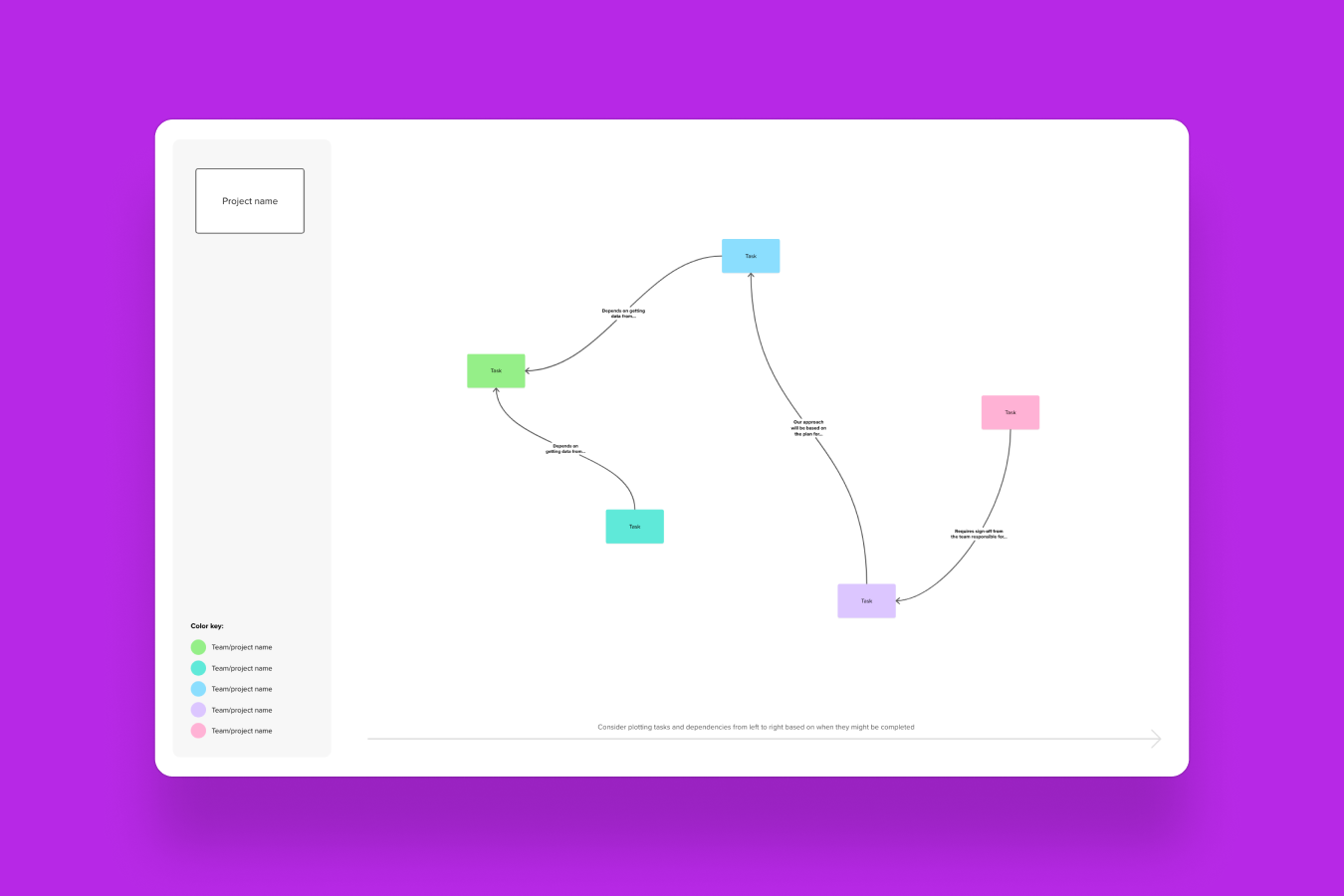
A dependency mapping template is a powerful tool for visualizing and managing the relationships between tasks, teams, or systems. It helps teams identify bottlenecks and risks, leading to better planning, improved team alignment, and smoother project execution. Whether you're a product manager, designer, engineer, or UX researcher, this template is essential for ensuring that all project dependencies are clearly mapped out and understood by everyone involved.
For instance, in a product launch scenario, a dependency map can show how the engineering team’s development tasks are linked to the marketing team’s promotional activities and the sales team’s customer outreach. This visualization helps identify critical paths and potential bottlenecks, ensuring that the launch is smooth and successful.
A dependency mapping template is a visual planning tool designed to help teams map the relationships between tasks or teams. It is particularly useful for complex or cross-functional projects, where understanding how different elements interact is crucial. Often visualized as a dependency map, this template provides a structured way to organize and communicate project dependencies, ensuring that everyone is on the same page and that potential issues are identified early.
Here’s what the dependency mapping template includes and how it helps teams visualize and manage dependencies:
Pre-built structure to map tasks and dependencies: Helps R&D teams map project dependencies with little effort.
Shapes and diagrammings: Use arrows, lines, and other visual elements to clearly indicate how tasks or teams are interconnected.
Infinite canvas to organize workflows: The template provides ample space to organize your workflows and project dependencies, allowing you to customize it to fit your specific needs.
Areas to label and categorize dependencies: Clearly label or color code areas to categorize different types of dependencies (like task dependencies, workflow dependencies, or system dependencies) to keep your map organized and easy to understand.
Real-time collaboration for cross-functional teams: Mural’s shared workspace allows team members from different departments (such as engineering, product, and design) to work together on the dependency map, ensuring everyone is aligned and has the same context.
Tools to highlight dependency by type: Use icons and labels to highlight potential risks, bottlenecks, or critical paths in your project, making it easier to address these issues proactively.
Follow these steps to effectively map your project dependencies:
Identify key tasks and stakeholders: Start by defining the scope of your project. List all the tasks, teams, or systems involved on stickynotes, and identify the stakeholders who will be contributing to or impacted by these elements.
Visualize dependencies: Cluster sticky notes and then use arrows, connectors, or flowcharts to group dependent tasks and workflows. This visual representation helps everyone understand the project’s structure, how different elements interconnect and dependent work.
Analyze risks and bottlenecks: Once your dependencies are mapped across projects, identify any potential delays or critical paths. This step is crucial for visualizing and
Align teams and take action: Gather the team and use the dependency map as a workspace to facilitate discussion, build mitigation plans, and align on next steps to keep projects on track.
For example, during a product launch, you might use the dependency mapping template to coordinate efforts between engineering, marketing, and sales. By visualizing how each team’s tasks depend on the others, you can ensure that the launch is well-organized and that all teams are aligned on the timeline and deliverables.
For more detailed guidance on how to spot blockers before sprint planning or how R&D teams can use a dependency map to manage project dependencies, check out our related resources.
Dependency mapping is critical in several scenarios, especially when dealing with complex or cross-functional projects. Here are some common situations when this template can turn delayed launches into on-time delivery.
Cross-functional team coordination: When multiple teams are involved in a project, a dependency map ensures that everyone understands their role and how their tasks impact the overall project. For R&D teams, this can be particularly useful for R&D team alignment.
Agile or sprint planning: In Agile environments, dependency mapping can help you identify and prioritize tasks for each sprint by
Product launches: A product launch involves many moving parts, from engineering to marketing. A dependency map can help you visualize these cross-functional relationships and align project teams on milestones and internal SLAs teams need to honor in order to launch on time.
IT systems or infrastructure mapping: For IT projects, a dependency map can help you understand how different systems or components interact, reducing the risk of integration issues. Pro Tip: Use AWS, Azure, and Google Cloud icons in the shapes and diagrams library to clearly illustrate connections between specific systems.
Risk management and mitigation: By mapping dependencies, you can identify potential risks and develop strategies to mitigate them. This is especially important in complex projects where one delay can have a cascading effect.
Running an effective dependency mapping session requires some preparation and clear communication. Here are some tips to ensure your session is productive:
Start with a clear scope and goals: Define the objectives of the session and the specific areas you want to cover. This helps keep the discussion focused and aligned with the project’s needs.
Involve all relevant stakeholders: Make sure that all team members and stakeholders who have a role in the project are present. This ensures that all dependencies are identified and that everyone’s input is considered.
Keep dependencies simple and visual: Use a straightforward and visual approach to mapping dependencies. Avoid overcomplicating the map, as this can make it harder to understand and use effectively.
Use color coding or labels for clarity: Color coding or labeling different types of dependencies (like task dependencies, workflow dependencies, or system dependencies) can make the map more readable and easier to navigate.
Focus on critical dependencies first: Prioritize mapping the most critical dependencies, which are those that could have the biggest impact on the project’s success. This helps you address the most important issues first.
Update regularly as projects evolve: A dependency map is a living document. Regularly update it to reflect changes in the project, new dependencies, or completed tasks. This keeps the map relevant and useful throughout the project’s lifecycle.
The key benefits of using a dependency mapping template for project planning include:
Clarity: A dependency map provides a clear, visual representation of how tasks and teams are interconnected, making it easier to understand the project’s structure.
Risk reduction: By identifying potential bottlenecks and critical paths, you can proactively manage risks and avoid delays.
Team alignment: A dependency map ensures that all team members are aligned on the project’s goals, timelines, and deliverables, reducing miscommunication and improving collaboration.
Efficiency: The template helps you prioritize tasks and resources, ensuring that the most important work is done first and that the project is executed more efficiently.
To create a dependency map for a project, follow these steps:
Identify tasks and nodes: List all the tasks or milestones that need to be completed for the project.
Define connections (dependencies): Determine how each task or milestone depends on others. For example, a marketing campaign might depend on the completion of a software feature.
Visualize the structure: Cluster sticky notes by dependency type visual elements like arrows or lines to connect the tasks and show the dependencies.
Collaborate with your team: Share the dependency map with your team and gather their input. Mural’s real-time collaboration features allow everyone to contribute and refine the map.
R&D teams can use a dependency map to manage project dependencies in several ways:
Mapping complex systems: R&D projects often involve complex systems, experiments, and interdependent workstreams. A dependency map helps visualize these relationships, making it easier to manage and coordinate efforts.
Visualizing research, engineering, and testing phases: The template can show how different phases of the R&D process (like research, engineering, and testing) are connected, ensuring that each phase is completed before moving on to the next.
Coordinating cross-functional teams: R&D teams often work closely with other departments, such as marketing and sales. A dependency map helps align these teams on timelines and deliverables, ensuring a cohesive and efficient project execution.
Continuously updating the map to reflect new or resolved dependencies: As projects evolve, R&D teams should regularly update the template to reflect new information, changes in scope, or completed tasks. This keeps the shared view accurate and useful throughout the project’s lifecycle.